3. Generate Grid
The Generate Grid panel builds the hex layers used by the rest of the workflow. It uses the AOI selected here and the Hex scale (m) from Setup.
Panel layout
The panel has these controls:
- Refresh Layers
- a. Set AOI
- Select Layers (collapsed by default)
- Build Hex Grid
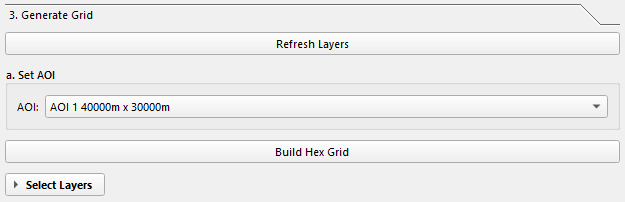
a. Set AOI
Choose the AOI you want to turn into a hex grid from the AOI dropdown.
If no AOI appears, click Refresh Layers first.
Select Layers
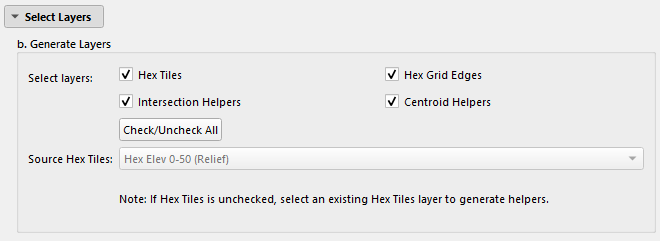
Expand Select Layers to choose which outputs to create.
| Layer | What it is | Notes |
|---|---|---|
| Hex Tiles | Polygon hex grid clipped to the AOI | Usually required. |
| Hex Grid Edges | Line version of the hex boundaries | Useful as an overlay. |
| Intersection Helpers | Point layer at hex vertices | Useful for snapping. |
| Centroid Helpers | Point layer at hex centers | Useful for labels and point-based analysis. |
All four are checked by default.
Check/Uncheck All
Use Check/Uncheck All to flip all layer checkboxes at once.
Using an existing Hex Tiles layer
If Hex Tiles is unchecked and one or more helper layers are still checked, the plugin requires an existing polygon hex layer in Source Hex Tiles.
Use this when you already have hex tiles and only want to regenerate helpers.
What Build Hex Grid does
When you click Build Hex Grid, the plugin:
- Reads the selected AOI.
- Creates a hex grid using the current hex scale.
- Clips the grid to the AOI polygon if Hex Tiles is enabled.
- Adds tile indexing fields to the tile layer.
- Creates helper layers from the tile layer if requested.
- Saves shapefiles under
Layers/Base/Base_Grid/<AOI>/. - Builds
.qixspatial indexes where possible. - Loads the saved layers into
Base > Base Grid > <AOI>.
This is a direct processing workflow. The current code does not run it as a background task.
Output files
The grid outputs are saved with these filenames:
Layers/Base/Base_Grid/<AOI>/
  hex_tiles_<hex_scale>m.shp
  hex_edges.shp
  hex_vertices.shp
  hex_centroids.shp
Only the files for the layers you selected are created.
Loaded layer names
When loaded back into QGIS, the layer names are:
Hex Grid Tiles - AOI <n> - <width> x <height> - <hex_scale>mHex Grid EdgesIntersection HelpersCentroid Helpers
Tile indexing fields
The generated Hex Tiles layer gets these attributes:
| Field | Meaning |
|---|---|
col_index |
Column number, starting from west to east |
row_index |
Two-digit row label within the current 99-row block |
row_extra |
Extra row block count once a column exceeds 99 rows |
id |
Combined tile id built from column and row labels |
If Centroid Helpers are generated, the centroid layer also receives the same tile index fields by matching each centroid to its parent polygon.
Styling
The plugin tries to apply these QML styles first:
hex_tiles.qmlhex_edges.qmlhex_vertices.qmlhex_centroids.qml
If a QML file is missing, the code falls back to built-in programmatic styling.
Notes
- You must have a valid project/output directory before running this step.
- If you generate only helper layers, Source Hex Tiles must be a polygon layer.
- The output group is nested under the AOI name, not directly under
Base > Base Grid.
Next: Elevation